Entity & Object Inspector
The Property Inspector (located on the right side of the Map Workspace) allows you to configure attributes, physics collision, combat statistics, particle behaviors, and script bindings for any placed map object.
Inspector Layout & Expandable Cards
When an entity is selected on the canvas or in the scene graph, the inspector displays organized, collapsible sections:
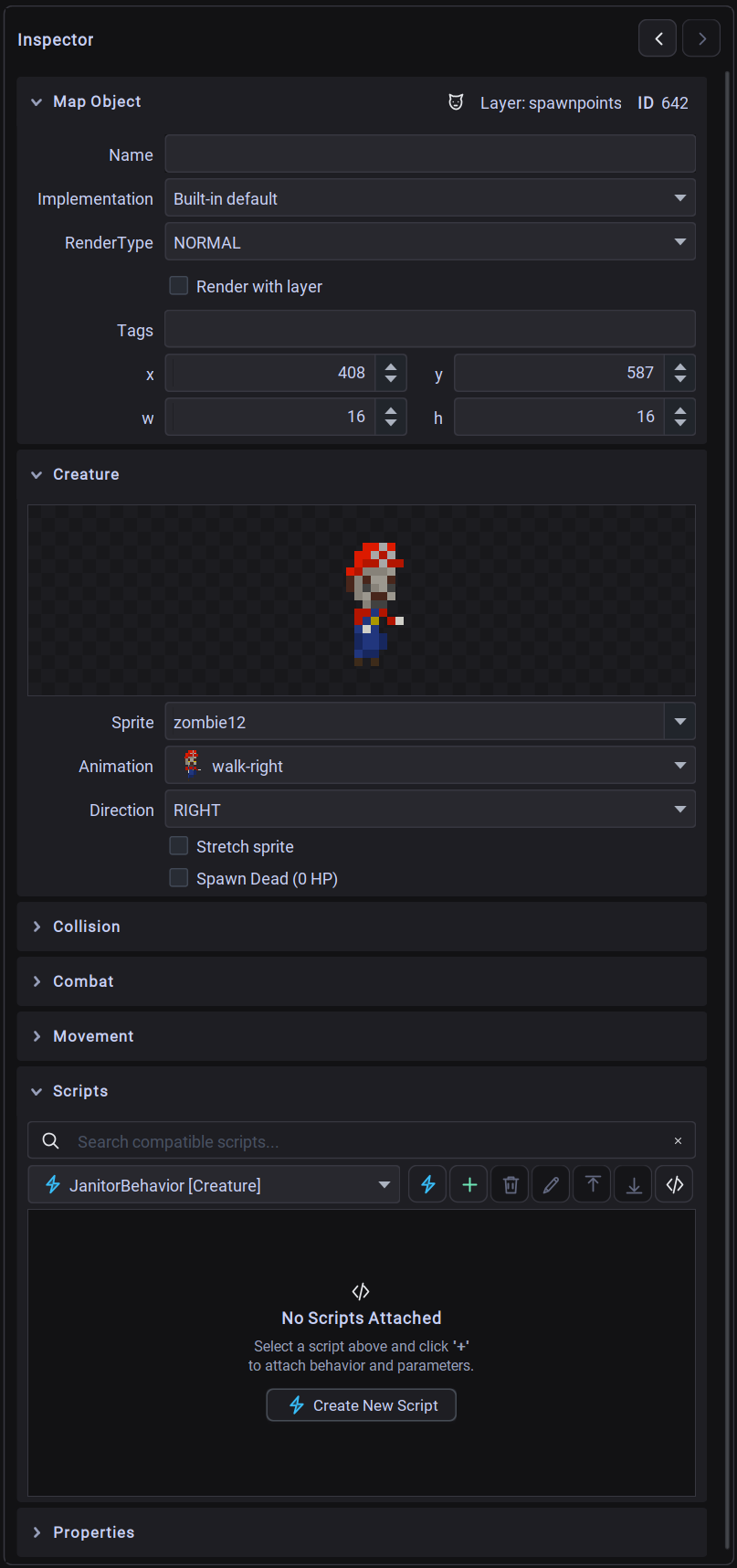 The utiLITI Entity Inspector showing collapsible configuration cards for general properties, entity-specific attributes, collision, combat, and scripts.
1. General Properties Card
Common to all entity types:
| Property | Description |
|---|---|
| ID | Unique integer identifier automatically assigned to the entity on the map. |
| Name | Custom string identifier used for querying entities in code (Game.world().environment().get("goblin_guard")). |
| RenderType | Determines the rendering phase: NORMAL, OVERLAY (drawn above entities), GROUND (drawn below entities), SURFACE, or UI. |
| Render with Layer | Checkbox indicating whether the entity's render order is strictly tied to its layer index. |
| Implementation | Dropdown listing compiled custom Java entity classes discovered in your project classpath (e.g. mygame.entities.Player). |
| Tags | Tag management panel (TagPanel) for adding comma-separated gameplay tags (e.g. hostile, destructible, interactable). |
| Layer | The object layer where this entity resides. |
| Transform (X, Y, W, H) | World coordinate position and boundary dimensions. Interactive spinners support pixel and grid snapping. |
2. Entity-Specific Inspector Panels
Props (PropPanel)
Interactive or static background scenery:
- Spritesheet: Select the visual sprite animation from project assets.
- Material: Material audio and particle archetype (
WOOD,STONE,STEEL,PLASTIC,CERAMIC,FLESH,FOLIAGE,UNDEFINED). - State: Initial visual state (
INTACT,DAMAGED,DESTROYED). - Add Shadow: Automatically renders a dynamic ground contact shadow.
- Flip / Rotation: Horizontal/vertical flipping and rotation angles.
- Collision Presets: Configure whether the prop acts as a solid physical obstacle.
Creatures (CreaturePanel)
Movable characters, NPCs, players, and enemies:
- Spritesheet: Character sprite set containing directional movement animations (idle, walk, attack).
- Scale Sprite: Toggle automatic sprite scaling to entity bounding dimensions.
- Direction: Initial facing orientation (
UP,DOWN,LEFT,RIGHT).
Triggers (TriggerPanel)
Spatial event triggers activated by player or creature interactions:
- Activation Type:
COLLISION: Fires when an entity enters the trigger's bounding box.INTERACT: Fires when the player presses the action key within the trigger area.TOGGLE: Switches state on and off repeatedly upon interaction.- Message: Custom string payload broadcast to target entities or the messaging system.
- Targets: Target entity names or comma-separated integer IDs to receive the trigger event.
- Cooldown: Cooldown period in milliseconds before the trigger can fire again.
- One-Time: Checkbox to permanently deactivate the trigger after its initial activation.
- Is Activated: Initial boolean activation state.
Light Sources (LightSourcePanel)
Dynamic 2D lighting emitters:
- Light Shape:
CIRCLE: Omnidirectional radial point light.RECTANGLE: Area light.FAN: Directional cone or flashlight beam.- Color: Color picker for light tint and alpha blending.
- Intensity: Brightness value from
0(off) to255(full intensity). - Active: Checkbox to enable or disable lighting at startup.
- Beam Angle & Arc: Configurable arc width (in degrees) for
FANdirectional lights.
Particle Emitters (EmitterPanel)
Visual particle effects (smoke, sparks, fire, magic, weather):
- General: Emitter type, particle limit, spawn rate, spawn amount, origin offset.
- Particle Type:
SPRITE,TEXT,RECTANGLE,CIRCLE,LINE,SHAPE,OVAL. - Physics & Motion:
- Lifespan min/max (ms).
- Gravity X/Y and delta velocity acceleration.
- Velocity X/Y initial burst speeds.
- Width/Height dimension expansion or contraction deltas.
- Fade-in, fade-out, fade-on-collision, and anti-aliasing toggles.
- Sub-Panels:
EmitterColorPanel: Gradient color ranges, start/end color, alpha range.EmitterTextPanel: Floating text list, font, text alignment.EmitterSpritePanel: Spritesheet animation sequence, loop mode.
Sound Sources (SoundPanel)
Positional 2D audio emitters:
- Sound: Sound asset picker from project audio resources.
- Volume: Audio playback volume slider (
0%–100%). - Loop: Checkbox to continuously loop the sound effect.
- Range: Acoustic attenuation radius in world pixels (volume drops off as the listener moves away).
Spawnpoints (SpawnpointPanel)
Locations where players or creatures spawn into the environment:
- Spawn Type: Creature type filter string matching creature sprites or class names.
- Direction: Initial facing direction for spawned entities (
UP,DOWN,LEFT,RIGHT).
Collision Boxes (CollisionBoxPanel)
Static physics obstacles preventing player/creature passage:
- Static bounding geometry used to block movement without requiring a rendered visual sprite.
Static Shadows (StaticShadowPanel)
2D directional shadow casters:
- Shadow Type: Directional projection offsets (
NOOFFSET,LEFT,RIGHT,DOWN,LEFTDOWN,RIGHTDOWN).
Map Areas (MapArea)
Non-rendered rectangular regions used for zone transitions, environmental weather effects, camera bounds, and scripting regions.
3. Sub-Inspector Sections
Collision Panel (CollisionPanel)
Configures physics collision bounding geometry:
- Collision Enabled: Toggle solid physical body.
- Collision Type:
STATIC(immovable geometry) orDYNAMIC(movable actors). - Collision Box Dimensions: Custom width, height, and alignment offset (e.g. aligning a character's collision box to their feet rather than whole sprite).
Combat Panel (CombatPanel)
Configures combat attributes for damageable entities:
- Hitpoints (HP): Maximum and current health points.
- Indestructible: Prevents the entity from taking combat damage.
- Team ID: Integer team identifier for friend-or-foe targeting.
Movement Panel (MovementPanel)
Configures entity locomotion:
- Velocity: Movement speed in pixels per second.
- Acceleration / Deceleration: Rate of speed ramp-up and braking.
- Turn on Move: Automatically rotates or flips sprite when moving.
4. Script Bindings Panel
The Scripts section attaches Java script components directly to map entities:
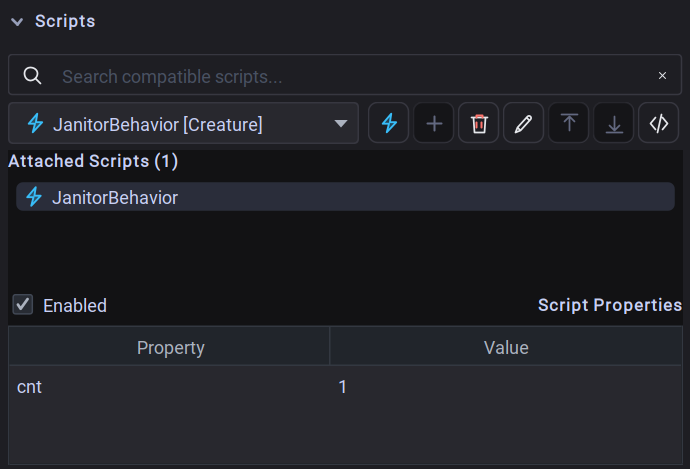 The Scripts section of the Entity Inspector showing attached scripts and typed script property fields.
- Attach Script: Choose any script asset from the dropdown and click
+. - Execution Order: Reorder scripts to control lifecycle execution sequence.
- Toggle Enabled: Enable or disable script execution per entity without deleting the binding.
- Edit
@ScriptPropertyFields: Inspect and customize tweakable script variables with typed visual editors (text, numeric spinners, checkboxes, color pickers, and file choosers). - Open in Workspace: Click the magnifying glass or double-click to jump directly to the script in the Scripts Workspace.
5. Custom Properties Panel (CustomPanel)
Store arbitrary user-defined metadata on any map object:
- Supported Types:
String,Integer,Float,Boolean,Color, andFile Path. - Accessible in code via
mapObject.getStringValue("key"),getIntValue(),getBoolValue(), etc.