Sprites & Animation Editor
The Sprite & Animation Editor (accessible via the Spritesheets asset category) allows you to import sprite sheets, configure frame slicing grids, define custom per-frame durations, test animations in a live playback preview, and export sprite metadata.
Editor Overview
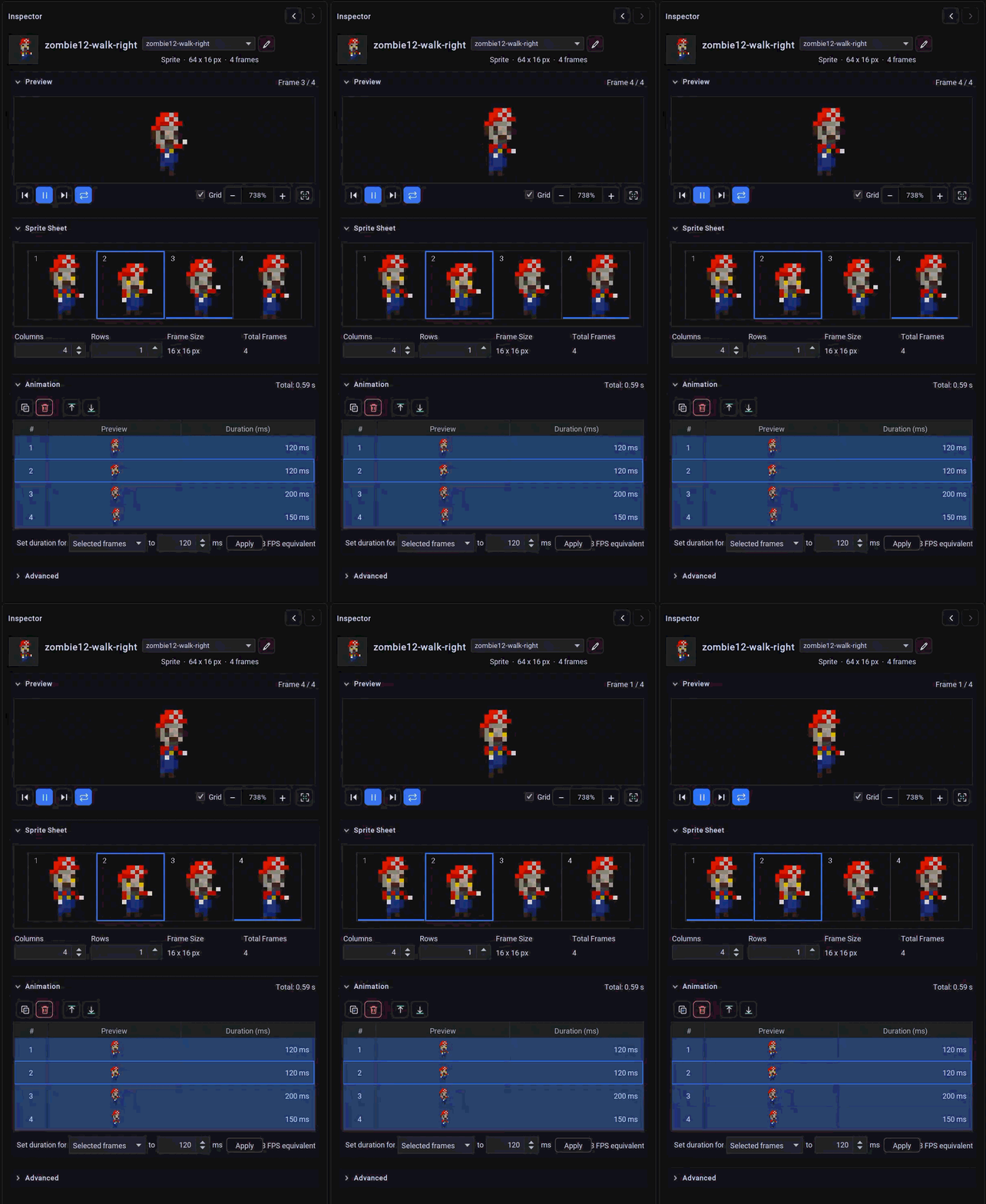 The Sprite & Animation Editor panel featuring interactive grid slicing, keyframe duration tables, and animated live preview.
1. Spritesheet Slicing & Metrics
When importing a character or effect sprite sheet (.png):
- Columns & Rows: Specify the number of horizontal columns and vertical rows in the image.
- Automatic Frame Dimension Calculation: utiLITI calculates the resulting
Frame WidthandFrame Heightin pixels. - Manual Overrides: You can also set explicit frame width and height to automatically deduce column/row counts.
- Dimension Validation: If the image dimensions are not evenly divisible by the frame dimensions, utiLITI flags a warning to prevent misaligned clipping.
2. Keyframe Duration Table
LITIENGINE supports variable keyframe durations, enabling fluid animation pacing (e.g. holding an anticipation frame longer before an attack swing):
- Individual Durations: Double-click any row in the duration table to specify its duration in milliseconds (e.g.
120ms). - Batch Uniform Duration: Set a duration value and click Apply to All to instantly synchronize all frames.
- Total Duration Summary: The panel displays the total animation loop time (e.g.
640ms total).
3. Live Animation Preview Player
The animated canvas preview provides rich playback testing:
- Playback Controls:
- Play / Pause (
/): Start or stop animation playback. - Step Forward / Backward (
/): Advance or reverse the animation one frame at a time. - Playback Speed: Adjust speed multipliers (
0.25x,0.5x,1.0x,2.0x) for slow-motion animation tuning. - Loop Toggle: Test single-shot vs. repeating animations.
- Zoom Factor: Switch between
1x,2x,4x, and8xzoom levels with crisp nearest-neighbor pixel scaling. - Current Frame Display: Live indicator showing active frame index and elapsed milliseconds.
4. Importing & Exporting Sprite Info Files
- Import Spritesheets: Resources -> Import -> Import Spritesheets... (
Ctrl + Shift + I). - Import Texture Atlas: Resources -> Import -> Import Texture Atlas... to import LibGDX or generic texture atlases.
- Export
.infoFiles: Select Resources -> Export -> Export Spritesheets... (Ctrl + E) to export.infotext files containing frame metrics and duration arrays.